


AI Chat for
HWR Berlin
With the development of HAWKI—led by Prof. Stefan Wölwer and Vincent Timm at HAWK (University of Applied Sciences and Arts Hildesheim/Holzminden/Göttingen)—and its provision as free open-source software, it became possible to deploy a GDPR-compliant generative AI chat at HWR Berlin starting in the 2024/25 winter semester.
During the 18-month HAWKI pilot phase, the requirements for generative AI at HWR Berlin evolved, as did the range of available providers and products. Additional alternative solutions meeting general requirements were sought and tested. Key factors in the selection process included user-friendliness, the effort required for implementation and maintenance, and the continuous further development of the software solution.
Open WebUI is now available as an open-source generative AI chat platform; it is GDPR-compliant and offers an expanded range of features. HWR Berlin currently provides access to OpenAI’s GPT-5-nano and GPT-5.2 models. In addition to saving and managing chat histories, users can now upload documents—such as PDFs—and use them as sources for the generative AI. All prompts continue to be transmitted anonymously, meaning that neither IP addresses nor user data are shared with the language model providers.
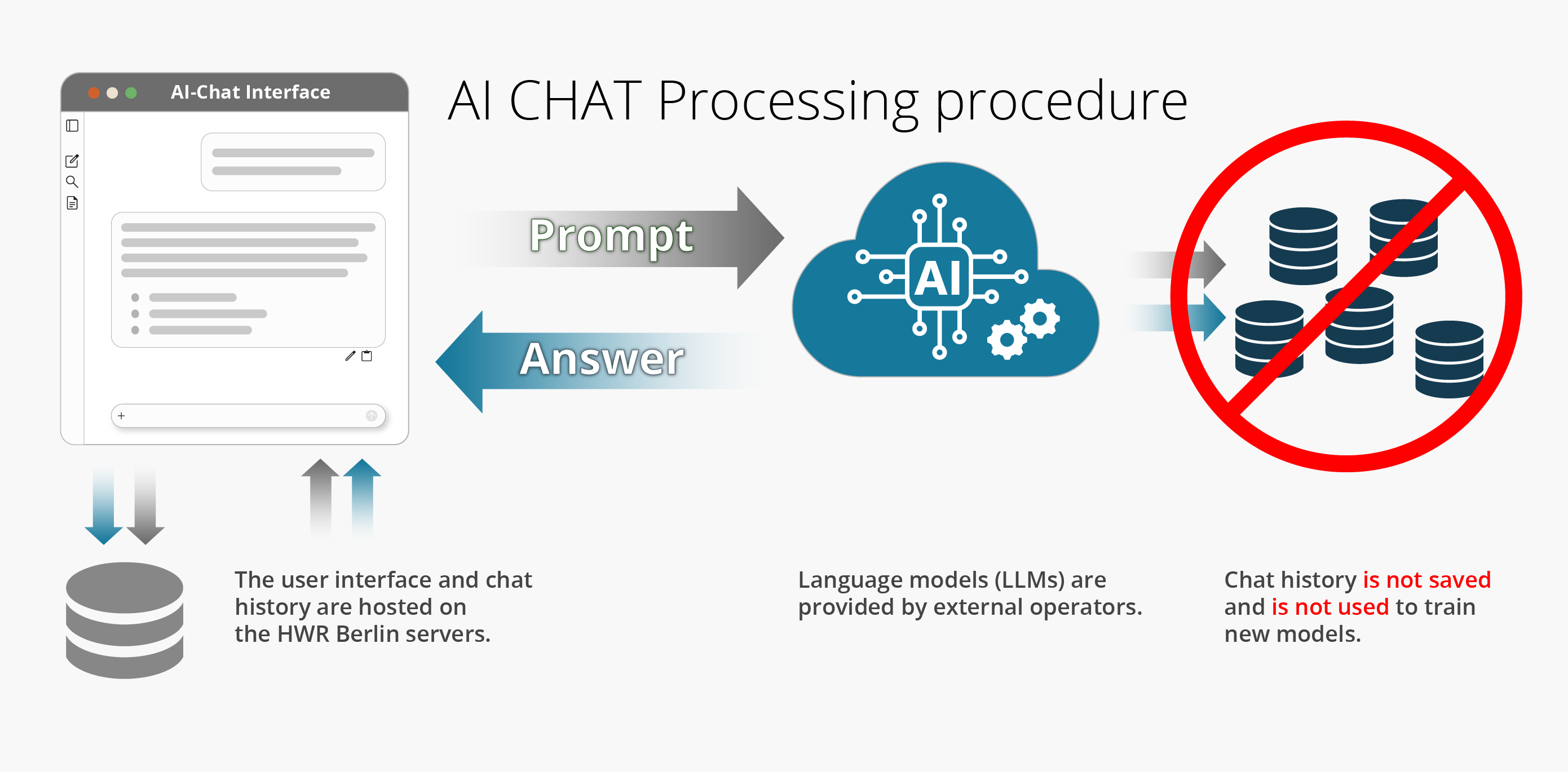
In accordance with the DSGVO
Only the prompts are forwarded to the external provider (OpenAI); no user data is transmitted. Prompts entered by users are processed and answered solely for the required purpose, without being stored by the external provider or used for training purposes.
What is
Open WebUI?
Open WebUI is the open-source, web-based application powering the AI chat service; it enables all members of HWR Berlin to use Large Language Models (LLMs) securely and easily in administration, studies, teaching, and research. The service is operated by the Information Technology Department and meets the necessary standards regarding data protection and IT security. Open WebUI replaces the previous AI service, HAWKI, which is being phased out by the 2026/27 winter semester.

Create images
Das Generieren von Bildern ist direkt im KI-Chat möglich. Mit dieser Funktion können Sie kreative Ideen in einzigartige visuelle Darstellungen umsetzen, was die Produktivität und Effizienz bei der Erstellung von Inhalten erheblich verbessern kann.
Save and organize chats
Saving and organizing chats with generative AI models offers significant advantages for knowledge management in the workplace. Saved chats serve as a valuable knowledge repository that can be revisited and reviewed at any time. Structured organization using folders and search functionality makes it possible to quickly locate and share relevant information.
Export chats
The export function enables the export of results from AI interactions—such as text, code, images, or notes—in various formats and their seamless integration into existing workflows and applications. This allows content to be easily processed further in other programs. The export feature allows chats to be downloaded as PDF documents (.pdf), text files (.txt), and JSON files (.json).
Coding Preview
A coding preview feature within the AI chat offers an advantage for developers and anyone working with code. Instead of simply receiving the generated code as text, the preview allows for a direct view of the code’s execution or a visual representation of the result. This significantly facilitates understanding the code, enables faster error detection, and allows functionality to be verified before the code is integrated into an existing project.
File upload
The ability to upload files directly into a generative AI chat offers a tremendous advantage for the work environment. Instead of manually typing or copying information into the chat, users can upload entire documents, spreadsheets, presentations, or code snippets for immediate analysis or editing. This not only saves time and minimizes the risk of errors but also allows for the processing of confidential information within a controlled environment. The AI can then answer specific questions about the content, create summaries, suggest changes, translate material, or even generate new ideas based on the uploaded data.
Notes
The built-in capability to create and save notes directly within the AI interface—and subsequently process them using the AI—offers a tremendous productivity advantage. Instead of switching between different applications, users can capture ideas, brainstorming sessions, task lists, or summaries right while interacting with the AI. These notes are not only centrally stored and easy to locate but can also be directly refined, expanded, and structured by the AI. For instance, the AI can generate coherent text from bullet points, organize notes by topic, or fill in missing information. This seamless integration of note-taking functionality and AI capabilities accelerates workflows and fosters efficient knowledge organization.
Search
The search function enables users to quickly and precisely locate past interactions, generated content, uploaded documents, and saved notes. Instead of spending time scrolling through chat histories, users can search specifically for keywords, phrases, file names, or particular content. This not only saves time but also fosters knowledge reuse and avoids unnecessary repetitive work.
